Showing posts with label project schedule. Show all posts

Friday, November 24, 2006

Cost Management is Not Optional

All too often, I see companies and/or projects where project cost management is not done at all. Project Managers just don't deal with the money aspect. In many companies, the PM is not expected to manage the cost of the project. In some, the PM is even discouraged from doing this.
I saw many organizations where the executives somehow did not even know that PMs can do this for their projects, let alone should do it. When the (skilled) PM brings the topic up and demonstrates how this can be done and how beneficial this is, they are surprised. And happy.
But it is a fact that in many places, PMs are not required to manage the project cost.

The point I want to make in this post is:

Even if you (the PM) are not expected to manage your project cost, you should still do it!

Considering the fact that cost is one of the 3 famous project constraints, this is one of the most fundamental skills that PMs must have and must apply for their projects. And, it is one the most important activities that the PM must engage in. Even if the PM is not required to manage cost, they must feel compelled to do it anyway. At least two reasons:

  • For your own professional development. As a PM you must become skilled in cost management. Without some basic skill and experience in this area, IMHO, you cannot be regarded as a senior professional. If you work in a company where cost management is not expected of you, what better environment can you have to practice and learn? And educate the management?
  • Cost management is a critical tool for better managing and executing projects and programs. Without cost management, it is impossible to calculate such things as ROI, NPV and Earned Value. If a company wants to have a solid project/program strategy, it must use these (and many other) tools. Without project cost management, the company gropes in the dark.
Company financials are not a simple matter at all. In order to perform really good project cost management, the PM must be familiar with general business financial management and the specifics of his organization. This requires from the PM a significant investment in time and effort to achieve a good level of expertise. This is undoubtedly a discouraging factor and may explain why cost management is a 'weak link" in software project management. However, I want to claim that this should not stop the PM from practicing some basic-level of cost management. Two important points:

Even minimal cost management can provide significant benefit
Forget all the company financial policies and general finance management theory. All you need to do is estimate costs and track expenses for your project. That's all. You'll be surprised how many good things can come out of this. And...

Minimal cost management is actually pretty easy to do
Current project management software tools make it relatively easy to estimate costs and track expenses. Here are some guidelines, using MS Project (although any project management software tool can do that).

In MS Project, go to the Resource Sheet. All your resources are listed here. For each resource it is possible to define various parameters. One of them is Std. Rate (= Standard Rate). This is measured in $/hour. All you need to do is enter the rate of each resource in the table. True, usually, you don't know how much a person's salary is but I am sure you can make a reasonable guess. As soon as you entered rates for all the resources, MS Project automatically calculates the cost of each task in your schedule, plus roll-up of totals to summary tasks, all the way up to the full project cost. Plus totals and breakdowns per resource. That's it. So simple, so powerful.

You can also easily add fixed costs (such as purchases, travel expenses, fixed-price consultaning, etc.). Add a task for each of the fixed cost items. Add the Fixed Cost pre-defined column in the table (see MS Project help on how to add columns). For each fixed cost entry in the schedule, enter its cost in the Fixed Cost column. That's it. So simple, so powerful.

Don't forget to baseline.

As the project progresses, be sure to update the schedule to correctly reflect the project status. You update the tasks (start date, end date, percent complete) and MS Project will calculate updated current costs. And with the baseline that you remembered to save, MS Project will also calculate all the Earned Value info for you, full break down and roll up.

Once you start doing this minimal work you will be surprised how easy and useful it is. And when you show it to your manager or executive (who did not even think you could do something like that), they will be delighted and never let you off the hook again.

This is why I say: cost management is not optional.

------------------------------------------------------------------------
Technorati Tags: , , , , , , ,
------------------------------------------------------------------------
Saturday, November 18, 2006

To Pad or Not to Pad

To many, this is still the question. We all know this practice. Make some time estimate, then pad it to compensate for... Actually for what not? Overloading, distractions, interruptions, pressure to speed up work, Murphy's Low and what not. Actually, one more: the inability of the programmer to do good estimates in the first place. Even the programmers admit that they are over-optimistic and that their time estimates are always too short.

This typical predicament is nicely expressed in Rita Mulcahy's book, PMP Exam Prep:

"I have no Idea how long it will take. I do not even know what I am being asked to do. So, what do I say? I will make my best guess and double it!"

In general, padding is bad. Again, as Rita explains it, "Padding is a sign of poor project management!". if you are not sure about your team's time estimates, you should treat is as a risk and not camouflage it as hidden padding.

Actually, why is it bad to pad? Here are several reasons:

  • Padding means that there is an inherent deficiency in the estimation (and likely in the estimator's skill). By padding, we disguise the problem instead of facing it and dealing with it.
  • When the resource sees their padded tasks, they naturally assume that their task completion date is the one that includes the pad. You are giving the resource "extra time" before they even started the task.
  • Once padded, the original estimation disappears. There is no way to hold the estimator accountable for their original estimates.

So, what do we, PMs, do? We know that if we take the estimators' input "at face value" we are most likely in trouble right from the first moment of the project. There are all kinds of things that a Project Manager can (and should) do to improve the situation. None of them is a magic bullet but in combination, they can improve things significantly. Here are some suggestions:

  • Give them more time. One of the most compromising factors is the time that we (don't) give to the estimator. If we ask the estimator to estimate a task and want an answer right then, we may assume that the estimator is just throwing a number in the air to get us off their back. Give them time and encourage them to use it to think more carefully and wisely.
  • Review the estimates with a critical eye. If you have experience in time estimation and in SW development, you can identify cases where the estimation doesn't seem right.
  • Let an expert review. An expert will be able to provide a lot of insight.
  • Train the estimator in time-estimation techniques. There are techniques for estimating time. verify that the estimators use them.
  • Remind them of the implied sub-tasks. Remind the estimator that there are typically several activities included in a single programming task. Once the programmer realizes that, he/she will benefit in 2 ways: It will be easier to make a more accurate estimation and it will help them remember to do all of these things
    • Some thinking, planning, designing.
    • Prototyping
    • Implementing
    • Developing unit tests
    • Unit-testing
    • Fixing bugs.

All the above are things that the estimator can do to improve their estimates. But there are also a couple of things that you, the Project Manager, can do.

Estimate Effort, not Duration

Estimators easily fall in this trap. They think in terms of duration rather than effort. This automatically introduces padding into the estimation process. You need to make sure they provide their estimates as effort. You usually will have to coach them on this and continuously verify that the numbers they give you are indeed effort and not duration. Estimates in duration muddy the waters.

Nobody Ever Works at Full Load

No human being executes their tasks at 100% of their time. People are human beings. They take breaks, rest, take care of administrative things, go to the doctor, etc. When an estimator provides an estimation of the effort, the number should reflect continuous, non-stop work. In real life, this never happens. Project Management SW tools allow you to specify the load level of the resource. I usually set the load of Individual Contributors to 80% and of Managers to 50%. Granted, this is probably a form of padding but it does not come from uncertainty in the estimate but rather from sound experience. It's not an uncertainty, it's a certainty that people do not perform at 100%. The only uncertainty is the actual percentage. This is up to you to estimate.

Add Project-Level Buffers

This is a mechanism that I invented years ago, only to learn that it was a standard element in Critical Chain Management. I found it extremely powerful even if I don't use Critical Chain Management. Here is how it works:


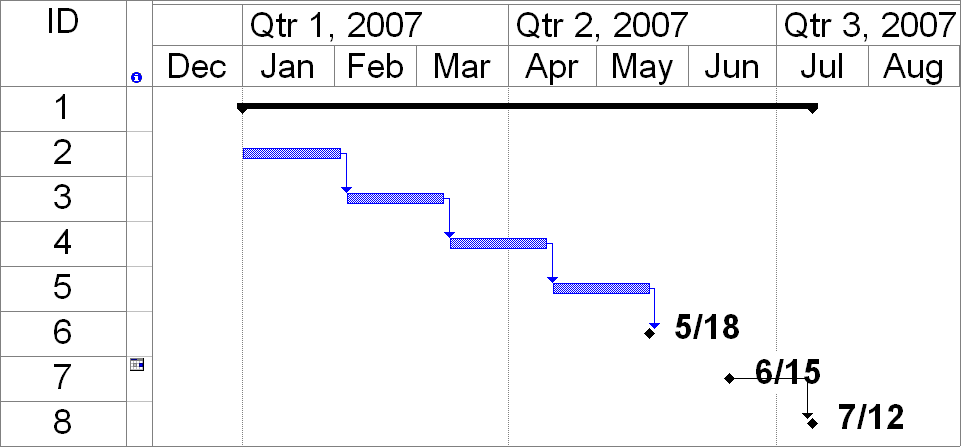
The Gantt chart shows a project with a series of tasks (in Blue). At the end of the project, I added 3 Milestones:

  • Optimistic. This is when all the tasks are complete. No buffers, no padding. In the chart it is on 5/18.
  • Realistic. This is a date I got by adding 20% to the total duration of the project (from day 1 to the Optimistic milestone). In the chart it is on 6/15.
  • Pessimistic. This is a date I got by adding 40% to the total duration of the project (from day 1 to the Optimistic milestone). In the chart it is on 7/12.

As the project progresses a delay may develop in the project end-date. This will cause the first (Optimistic) milestone to move to the right. The other 2 milestones never move. This way we can see how the current projected end-date moves relative to the buffers. In other words, how much of the buffers is being consumed by the delay. This is an excellent indicator that allows the PM to see "how bad things are" and decide if it's time to take some corrective actions.

These are my safety buffers. Generally, I prefer not to show the 3 buffers to my team members. I only show the Optimistic milestone and do not even call it Optimistic. As far as they are concerned, that is the target date that they need to hit. The 3 milestones are for the people that I am accountable to: My manager, the project sponsor, the executives and the customer. I explain these milestones to them as follows:

  • Optimistic. We will finish the project on this date only if everything goes perfectly. No delays, no surprises. This is the ideal end date. I have a low level of confidence in this date but I am going to drive the project to this date and try to hit it.
  • Realistic. I think this is the date that I can realistically hit and I recommend that you assume and make your plans to this date. I have a good level of confidence in this date.
  • Pessimistic. This is the day we will be done if many things go really wrong. I have a high level of confidence in this date.
  • If the project runs later than the Pessimistic milestone, something is really bad in the project and we need to reevaluate the entire project.

I used this approach in the past with great success. Managers and customers were very impressed and pleased with this approach. They stopped being fixated on a single delivery date. Now the project is not held by its throat to a single date. There is flexibility but it's OK with management and customers because it is not open-ended. It is bounded. They accept the fact that I do not commit to a single date because they know it's not realistic but they are not worried that I open the door to a runaway project because the end date has a reasonable range.

Let me know what you think...

---------------------------------------------------------------------------------

---------------------------------------------------------------------------------